On popular request, here finally the write-up of my Obsidian setup. It’s somewhat elaborate but I’ve tried to keep it as simple as possible.
At its core most of my Obsidian time is spent in the Daily Note which is also where most of my actual work happens. I tried to get to a similar setup in my previous note taking tool Foam (see my PR) but there were too many limitations for it to work well.
The Github Gist of the entire setup is here: https://gist.github.com/alper/2bbf8f3cb60466b55026deb47f8e15e6
The main way I use this is I create a new Daily Note for a day and this template seeds that note with all the scaffolding and information I need to be successful that day. It automates and structures what would otherwise be a relatively miserable sequence of manual steps and copy-paste-ing.
The plugins that I use for this are:
Let’s go through the template file from the top:
# {{date:dddd, MMMM Do, YYYY}}This sets the title of the note to the date that we are creating the note for. Nothing very special here but note that with Calendar we can create a daily note for any date (it doesn’t have to be today) and that date is passed in as a parameter to the template.
Tasks#
Then comes the tasks section:
### Due Today

```tasks
[^1] AND NOT done
```

### Scheduled Today

```tasks
[^2] AND NOT done
```

### Done Today

```tasks
done on <% tp.file.title %>
```
This is a triple that lists all my tasks that are due on that day (or were before), all my tasks that are scheduled for that day (or were before) and if I finish anything, it will list those tasks under the third section as my work log.
The hack here is that the ISO date is passed in to the templates as ` file.title and can then be used to query Tasks. It took me a bit to get this to escape right and figure out how to write the complex boolean condition.
I moved away from Things when I discovered the Obsidian Tasks plugin. Tasks allows me to close over all the tasks that are in my notes and is incredibly flexible and powerful. Being able to do arbitrary queries on tasks in any markdown file in my workspace is nothing short of amazing. I’m still waiting for Notion and other tools to offer something similar.
I always felt the split between taking notes and capturing tasks was incredibly broken and created lots of unnecessary friction. For instance this nonsense with bear:// protocol links in Things that is delusionally claiming that “Bear & Things 3 Work Really Well Together”. These two things should be in the same environment.
Calendar#
Then the second part is a section that creates a scaffold with all the appointments I have for that day formatted as markdown stubs.
It works using this relatively obscure and somewhat finicky tool ical-buddy. In the template I call a Templater user function days_events:
<% tp.user.days_events({CURRENT_DATE: tp.file.title}) %>which inserts the result of the following command in-place:
icalBuddy -ec "FE0B6DAB-E598-4DE1-9F2B-7DE06A236647,4242177B-7D2B-4A20-AE23-A99DD51D5B80" -eep '*' eventsFrom:$CURRENT_DATE to:$CURRENT_DATE | sd '•' '##' | sd '\(alper@example.com\)' '' | sd '\n' '\n\n* \n\n'This call to icalBuddy excludes a bunch of calendars I’m not interested in, queries the calendar for events within the specified day and then does a bunch of replace actions that turn it into markdown.
I don’t use Calendar.app (preferring Cron at the moment) but I have my Google Calendar setup in macOS System Settings and leave Calendar open for it to always have up to date data.
Result#
Putting everything together, when I double-click on a day, I get a document that looks a bit like this:
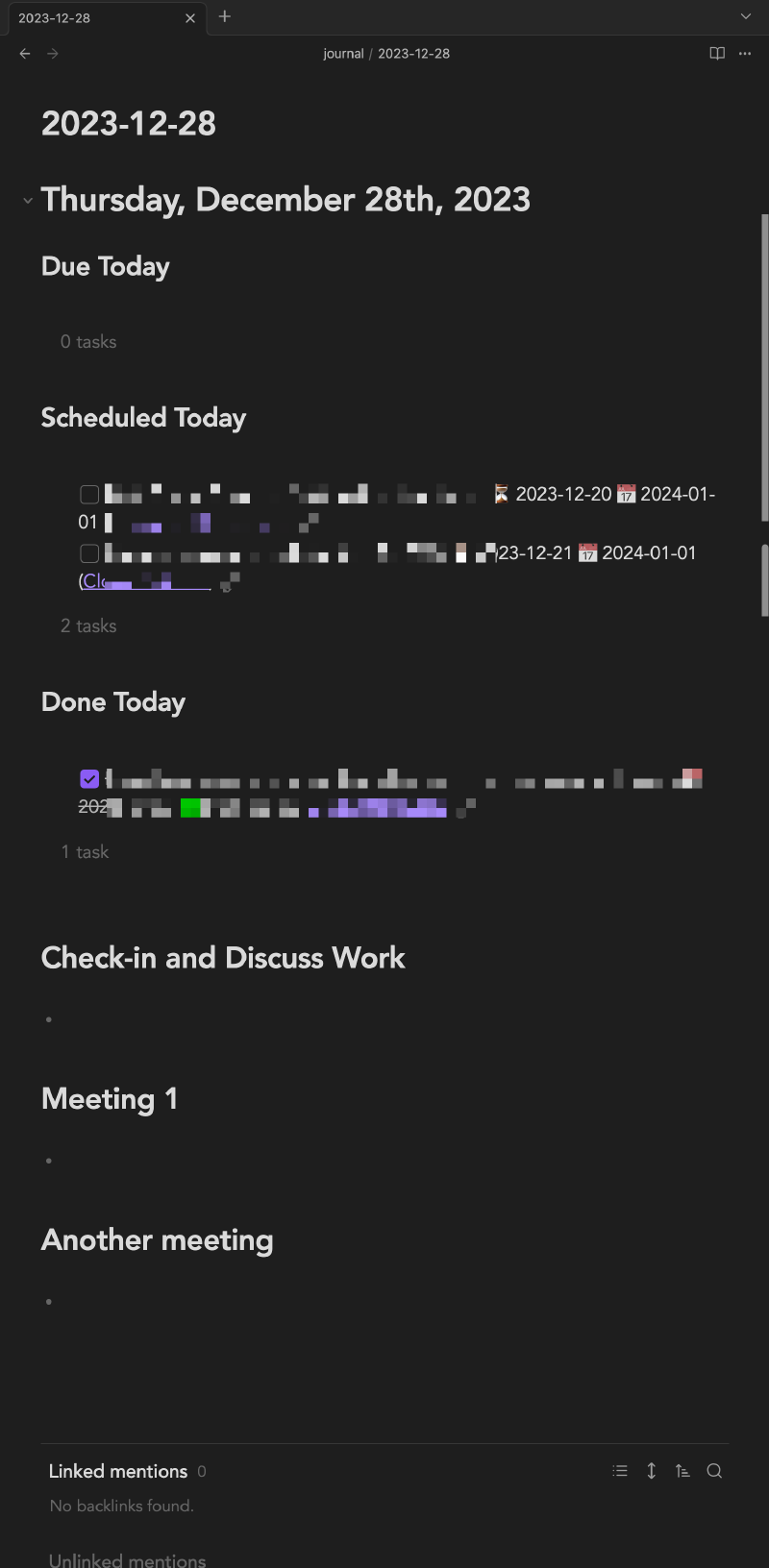
The fact that it’s fully automated and that with a single action I can get a relatively complete informational dashboard for what I should be doing that day has been an immense load off. It allows me to hit the ground running and immediately start sifting tasks, go through my meetings and create a plan for the day.
When I know a day is coming up that’s going to be particularly intense, I create the daily note for it ahead of time and start lining up information and talking points for each appointment in the scaffold. Reducing the effort it takes to start that prep and storing it in a standardised format makes it much more likely that I’ll do it and use it. With that preparation ready-to-go in Obsidian it takes out all the stress and I can run my day in a pure flow state.